Wix vs a custom website: when your business should make the switch
Wix is great for getting started. Here are the signs your business has outgrown it, and how to move to a custom website without losing your Google rankings.
Short answer: stay on Wix while it lets you sell, get found and run your business without workarounds. Switch when you need features Wix cannot do, when your site is slow or hard to rank, or when your business depends on a platform you do not control.
We build on Wix too. Many of the websites we have launched run on it, because for a lot of businesses it is the right tool. But we also see the moment when a company outgrows it. Here is how to recognize that moment, what “custom” actually means, and how to make the move without losing what you have built.
Wix and “custom”: what the words mean
Before comparing, it helps to be precise, because “custom website” means different things to different providers.
- Website builder (Wix, Squarespace and similar). A hosted service. You design pages with drag and drop, and the company runs the servers, security and updates. You rent the platform; you do not get the code.
- Custom website. A site built with code by a developer, usually with a framework (a set of building blocks such as Next.js or Astro) and a content management system (CMS) so your team can edit content. You own the code and can host it where you want.
- Custom platform or web application. Goes beyond pages: user accounts, dashboards, matching logic, payments, integrations. This is software that happens to live on the web.
Many businesses only need the first. Some need the second for control and performance. A smaller group needs the third because their business model depends on it.
What Wix does well
Wix is popular for good reasons:
- Speed to launch. A professional site can be live in days.
- Easy editing. Your team can change text and photos without a developer.
- Built-in tools. Bookings, forms, a blog, a basic online store and hosting come in the box.
- Predictable cost. One monthly plan covers hosting, security certificates and updates.
- No server to manage. Platform security and uptime are Wix’s job, not yours.
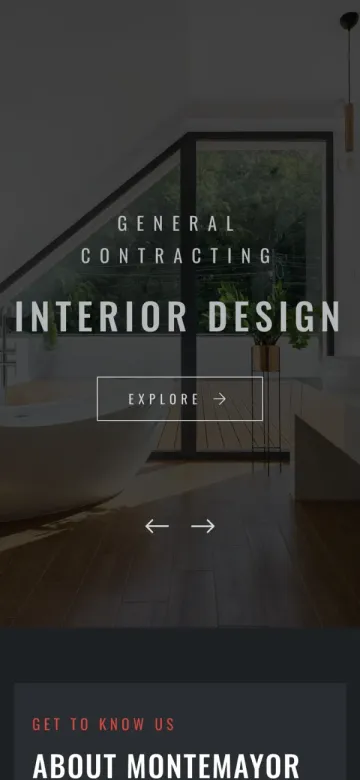
For a contractor, a law firm, a consultant or a local service business, that is often everything the website needs to do. When a Toronto general contractor came to us with a domain question, we rebuilt his site on Wix, migrated every project and had it live in a single day. That was the right call for his business: 21 project pages and six service pages, launched fast, easy for him to keep updated.
Seven signs you have outgrown Wix
1. You need features that do not exist as an app
Matching buyers with properties, a player portal with payments and team chat, or an internal dashboard are not plugins you install. They are software. When your idea only works “if the website could just…” you are describing a custom build.
2. Your business runs on workarounds
Spreadsheets that someone copies into the site every week, forms that email a person who retypes the data, three tools that do not talk to each other. Custom software removes the copying and connects the pieces. If you want to see what else can be automated once the data is connected, read our guide to AI automation for business.
3. You need to integrate with your own systems
Connecting a CRM, an ERP, a payment provider beyond the standard options or an internal database is limited on Wix. A custom site talks to any system that has an API (an interface that lets two pieces of software exchange data).
4. Speed and SEO have hit a ceiling
Wix has improved a lot, but you still work within its structure. If you need full control over how pages load, how they are structured for search engines, or how content is generated at scale (for example, one page for every city you serve), a custom site gives you that control. If your problem is visibility more than platform, start with why a website does not show up on Google; the fix may not require a rebuild.
5. You need real user accounts and roles
Owners who upload their own listings, admins who approve them, customers who manage their orders: accounts with different permissions are a core feature of software, not a website builder.
6. You want to own your code
Wix’s own help centre explains that its sites run on Wix’s proprietary technology and cannot be exported to another host. If the platform changes its pricing or features, you adapt or rebuild. A custom site is code you own and can host anywhere.
7. The monthly apps add up
When you pay for several premium apps to patch gaps, the total cost of staying can exceed the cost of building exactly what you need. List every subscription tied to your site, then compare that yearly total with what a custom build would replace. Our guide on what drives website cost in Canada explains the factors behind a quote.
Signs you should stay on Wix (for now)
Switching has a cost, and it is not always worth it. Stay where you are if:
- Your site brings in leads and nobody on the team is fighting the platform.
- Your needs are pages, a blog, forms and simple bookings.
- You do not have the budget or time to plan a proper migration this year. A rushed move is worse than no move.
- Your real problem is content or SEO, not the platform. A better site structure and stronger service pages often help more than new technology.
What a custom build looks like in practice
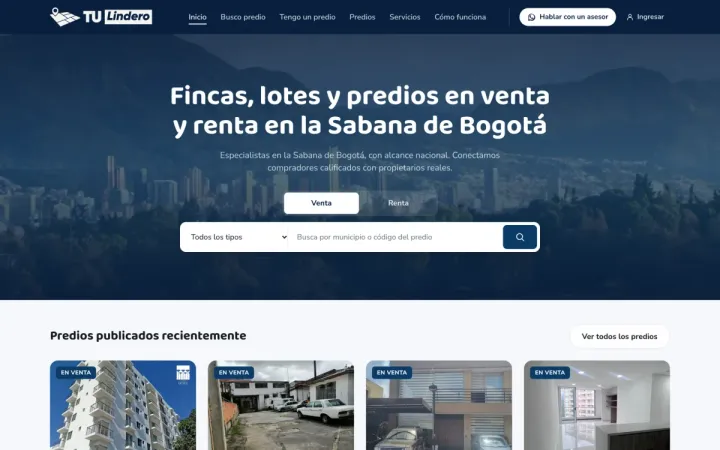
Tulindero needed a real estate platform that matches qualified buyers with farms and plots around Bogotá. No website builder could do it, so we built it from scratch: a property map, owner accounts, buyer matching, an admin portal, automated emails and a page for every municipality to rank on Google.
AMA Legal, a Toronto immigration firm, needed something in between: a complete website where clients read about eight practice areas in five languages, then book and pay for a consultation online. The requirement was not “more pages”, it was a clear path from first visit to paid consultation, in the client’s own language.
That is the difference. A website builder gives you pages. Custom software gives you a system shaped around how your business actually works.
Wix vs custom: side by side
| Wix | Custom website or platform | |
|---|---|---|
| Time to launch | Days | Weeks, depending on scope |
| Editing | Visual editor | CMS or admin area built for your content |
| Features | What Wix and its app market offer | Anything you can specify and build |
| Integrations | Limited to supported apps | Any system with an API |
| Hosting | Wix only | Your choice of host or cloud |
| Code ownership | Rented platform | You own the code |
| Maintenance | Included in the plan | Needs a named person or provider |
How to move from Wix without losing your rankings
A migration is where businesses lose traffic, and it is avoidable. Because a Wix site cannot be exported, a move is a rebuild, so plan it like a project.
Step 1: Inventory every page that matters
Check Google Search Console for the pages that bring visitors and the ones other sites link to. Export the list of URLs into a spreadsheet. This becomes your redirect map.
Step 2: Export what you can
Wix lets you export some content types, such as blog posts or product lists, depending on what you use. Everything else (page text, images, project galleries) is copied across during the rebuild. Save original images now, not after your plan ends.
Step 3: Keep or improve the content
Do not throw away pages that rank. Move them and make them better. A migration is a good moment to fill gaps, such as a dedicated page for each service.
Step 4: Redirect every old URL
Each Wix address should point to its new equivalent with a permanent redirect. Google’s site move guidance recommends permanent (301 or 308) server-side redirects, avoiding long chains of redirects, and keeping them in place for at least a year so rankings and links transfer to the new URLs.
Step 5: Keep your domain
Your domain carries your history with Google. If Wix is your registrar, transfer the domain; if it was bought elsewhere, point it at the new host.
Step 6: Launch and submit the new sitemap
Submit the new sitemap in Google Search Console and Bing Webmaster Tools the day you launch.
Step 7: Watch the first weeks closely
Check Search Console for crawl errors and pages not found, and fix broken links quickly. Some movement in rankings is normal at first; steady drops on specific pages usually point to a missing redirect.
Common migration mistakes
- Launching without a redirect map. Every old URL that returns an error is a lost visitor and lost ranking signals.
- Redirecting everything to the home page. Visitors land somewhere they did not expect, and search engines may treat it like a missing page. Map each URL to its closest match.
- Dropping content to “clean up”. Pages that look unimportant may be the ones bringing in search traffic.
- Forgetting forms and tracking. Contact forms, booking tools, analytics and advertising tags must work on day one.
- Cancelling Wix too early. Keep the old plan until the new site is live, checked and your domain has moved.
- Skipping accessibility. In Ontario, businesses with 50 or more employees must make public websites meet WCAG 2.0 Level AA under the AODA. A rebuild is the cheapest time to get it right. See our AODA website compliance guide.
Questions to ask before you hire someone to rebuild
- Will I own the code, the design files and the hosting accounts?
- How will my team edit content after launch? Can you show me?
- Who builds the redirect map, and how will you check it after launch?
- Who is responsible for updates, security and backups, and what does that cost each year?
- What happens if we stop working together? Can another developer take over?
Good answers to these questions matter more than a portfolio. Our guide on choosing a software development company goes deeper.
Should you switch? A quick decision guide
| Your situation | Best fit |
|---|---|
| You need a professional site, a blog and simple bookings | Wix or a similar builder |
| You sell a few products online | Wix, Shopify or similar |
| You need accounts, custom logic or integrations | Custom website or platform |
| Your process depends on copying data between tools | Custom software |
| You want full ownership and control of your code | Custom build |
| Your site is fine but nobody finds it | Fix SEO and content first |
The bottom line
The best platform is the one that fits the business you are building, not the one you started with. We build on Wix and we build custom, so we do not need to push you either way. If you are not sure which side of the line you are on, look at our web and mobile development and custom software services, or tell us what you are trying to do and we will give you an honest recommendation, even if the answer is to stay where you are.
Frequently asked questions
Is Wix good enough for a small business?
Often, yes. For a brochure site, a portfolio or a simple booking page, Wix is fast to launch and easy to update. It becomes a problem when you need custom features, deeper SEO control, integrations with your own systems, or full ownership of your code.
Can I move my Wix website to another platform?
Wix does not let you export your site to another host, so a move means rebuilding the site. Your content, images and URLs can be carried over, and with proper redirects you keep the Google rankings you already have.
Will I lose my Google rankings if I leave Wix?
Not if the move is planned. Keep your important pages, redirect every old URL to its new equivalent, submit the new sitemap to Google Search Console and keep your content. Most rankings survive a well-run migration.
How long does it take to move from Wix to a new website?
It depends on the size of the site and what the new one needs to do. A contractor site with its projects can move in a day, while a custom platform with accounts and an admin portal takes weeks of planning and building.
Can I keep my domain name if I leave Wix?
Yes. A domain bought through Wix can be transferred to another registrar, and a domain bought elsewhere can simply be pointed at your new site. Keeping the same domain is one of the most important steps for protecting your search rankings.
Will my team still be able to edit a custom website?
It should. A well-built custom site includes a content management system or admin area where your team edits text, photos, blog posts and listings without a developer. Ask any provider to show you the editing screens before you sign.
Is a custom website more secure than Wix?
Not automatically. Wix handles hosting, certificates and platform updates for you; with a custom site, someone has to own updates, backups and monitoring. A custom site is secure when that responsibility is clearly assigned in your contract.
Proof, not promises