Why your website is not showing up on Google (and how to fix it)
Your site is live but nobody finds it. Here are the nine most common reasons a business website does not appear on Google, and what to do about each one.
Short answer: most business websites are missing from Google for one of three reasons: Google has not found them yet, something tells Google not to show them, or other pages answer the searcher’s question better. All three can be fixed.
Start with one test. Search site:yourdomain.com on Google.
- No results at all? Google has not indexed your site. Go to reasons 1 to 4.
- Your pages appear, but not for the searches you care about? You have a ranking problem. Go to reasons 5 to 9.
Three words you need to know
SEO advice often mixes up three different things.
- Crawling: Google’s bot (Googlebot) visits your pages and reads them. If it cannot reach a page, nothing else happens.
- Indexing: Google decides to store the page in its index, the giant library it searches through. A page can be crawled and still not be indexed.
- Ranking: when someone searches, Google picks which indexed pages to show and in what order. Being indexed only gets you into the library; ranking decides whether anyone finds you on the shelf.
Reasons 1 to 4 below are crawling and indexing problems. Reasons 5 to 9 are ranking problems.
How to diagnose the problem in 15 minutes
You do not need paid tools for a first diagnosis. You need Google Search Console, which is free.
- Verify your site in Google Search Console. Use the “Domain” property if you can, so it covers
www, non-www,httpandhttpsin one place. - Open the Page indexing report (under Indexing, then Pages). It lists how many pages are indexed and, for the ones that are not, the reason: “Excluded by noindex tag”, “Blocked by robots.txt”, “Duplicate without user-selected canonical”, “Crawled, currently not indexed” and so on. Each reason points to one of the fixes below.
- Inspect your most important page. Paste its address into the URL Inspection bar at the top. It shows whether the page is on Google, which version Google considers the main one, and when it was last crawled. The “Test live URL” button checks the page as it is right now, which is useful after a fix.
- Check the Performance report. If pages are indexed, this shows which searches you already appear for, how often and in what position. It is the fastest way to see whether you have an indexing problem or a ranking problem.
Two caveats from Google’s own documentation: a page marked “URL is on Google” is not guaranteed to appear in results, and clicking “Request Indexing” asks Google to crawl sooner but does not guarantee the page will be indexed. Google also notes that indexing typically takes a day or so but can take much longer.
Symptom and likely cause at a glance
| What you see | Most likely cause | Where to look |
|---|---|---|
site: search returns nothing |
New site, or the whole site is blocked | Reasons 1 and 2 |
| Some pages indexed, key pages missing | noindex, duplicates or thin pages |
Reasons 2 and 3 |
| “Crawled, currently not indexed” | Google saw the page and did not think it was worth storing | Reasons 5, 6 and 8 |
| Indexed, but on page 3 or beyond | Weak content match or weak reputation | Reasons 5 to 9 |
| Visible in search, missing on Maps | Google Business Profile problem | Reason 7 |
Problems that keep you out of Google entirely
1. Google has not found your site yet
New sites take time to be discovered. Speed it up by creating a free Google Search Console account, verifying your domain and submitting your sitemap (usually yourdomain.com/sitemap.xml). Do the same in Bing Webmaster Tools, which also feeds several AI assistants.
Links help discovery too. A link from your Google Business Profile, your social profiles and a couple of relevant directories gives Googlebot a path to follow. Inside your site, make sure every important page is linked from your menu or from another page. A page that nothing links to (an “orphan page”) is hard for Google to find even if it is in the sitemap.
2. Your site is telling search engines to stay away
It is more common than you think, especially after a redesign. A checkbox such as “hide this site from search engines”, a noindex tag left over from development, or a robots.txt file that blocks everything will keep you out. Search Console flags all of these under Pages.
How to check without technical tools:
- Open
yourdomain.com/robots.txt. If you seeDisallow: /underUser-agent: *, you are blocking every crawler from the whole site. - On an important page, right-click, choose “View page source” and search for
noindex. If it appears in arobotsmeta tag, that page is asking not to be indexed. - In your website builder or CMS, look for any setting about search engine visibility.
A common mix-up: robots.txt controls crawling, not indexing. Google’s documentation explains that a page blocked by robots.txt can still show up in results if other sites link to it, and that its crawler will never see a noindex tag on a page it is not allowed to fetch. If you want a page out of Google (a thank-you page, a staging copy), let it be crawled and use noindex. If you want it in Google, do neither.
3. Pages are duplicated or point somewhere else
When the same content lives at several addresses (with and without www, with and without a trailing slash, old and new URLs), Google picks one and may ignore the rest. Choose one version of your domain, redirect the others to it and set canonical tags.
After a redesign, this is where most traffic gets lost. Old pages that ranked well now return a “page not found” error, and the new pages start from scratch. The fix is a 301 redirect from every old address to its closest new equivalent. Before any rebuild, export a list of your current pages (Search Console’s Performance report is a good source) so nothing is forgotten. When we rebuilt the site for Montemayor General Contracting, all 21 existing project pages were migrated with their photos rather than left behind.
4. The site is too slow or broken on mobile
Google indexes the mobile version of your site. Its documentation is direct: it uses the mobile version of a site’s content, crawled with a smartphone agent, for indexing and ranking. If your site is slow, cut off or hard to use on a phone, it is at a disadvantage. Test it with PageSpeed Insights and fix what it reports.
Watch for content that exists on desktop but is hidden or removed on mobile. Google recommends that the mobile site contain the same content as the desktop site. If your service descriptions or reviews disappear on small screens, Google may not count them at all.
Problems that keep you from ranking
5. One page tries to rank for everything
A single “Services” page cannot rank for bathroom renovations, basement finishing and kitchen remodels at the same time. Give each service its own page, written around what people type. When we rebuilt the site for a Toronto contractor, each of his six services got its own page, and his projects came with it.
A strong service page usually has:
- A title and H1 that name the service and the area, for example “Basement Finishing in Toronto”.
- A short answer to the main question in the first paragraph: what you do, for whom, where.
- What is included, how the process works and how long it typically takes.
- Photos or examples of that specific service, not generic stock images.
- Answers to the questions clients ask on the phone.
- A clear next step, such as a quote form or phone number.
6. The words on the page do not match the search
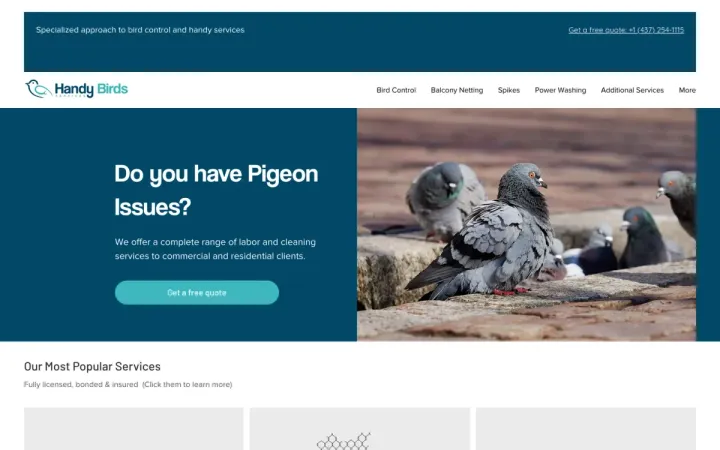
People search “bird control Toronto” or “balcony netting”, not “comprehensive avian management solutions”. Use the words your customers use, in your page titles, headings and first paragraphs. That is how we structured the site for Handy Bird Services.
To find those words, listen to how clients describe the problem on the phone, look at the “People also ask” box and the suggestions at the bottom of Google’s results page, and check which searches already bring you impressions in Search Console. If you serve clients in more than one language, each language needs its own properly marked-up page; our guide to multilingual websites in Toronto explains how.
7. You are missing local signals
For local searches, Google leans heavily on your Google Business Profile, your reviews and consistent business information across the web. Service-area businesses can list a service area instead of a street address. Ask every happy client for a review.
A few details that matter, from Google’s own Business Profile help:
- If you do not serve customers at your address, remove the address from your profile and set a service area instead.
- Service areas are set by city, postal code or region, not by a radius. Google allows up to 20 service areas and says the overall area should not extend beyond about two hours of driving from where the business is based.
- Pick the most specific primary category that describes your business, then add secondary categories for other services.
Keep your business name, phone number and address (or service area) identical on your website, Google Business Profile, social profiles and directories. Small inconsistencies, such as an old phone number on one directory, make it harder for Google to be confident that these listings all describe the same business.
8. Nothing proves you are good at what you do
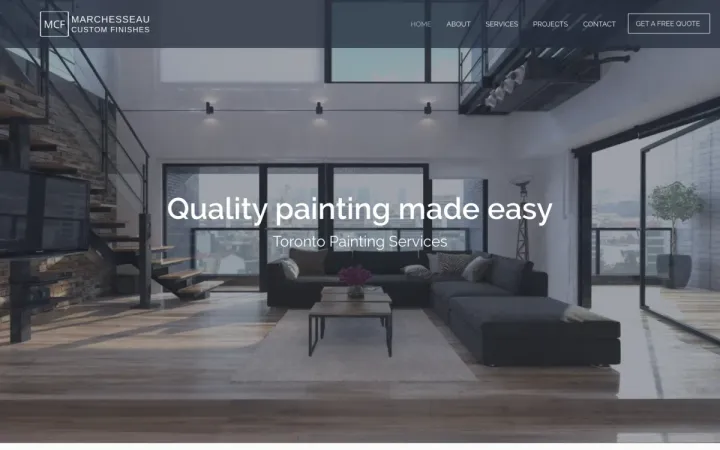
Search engines, and the people behind the searches, look for evidence: real projects, photos of your work, case studies, reviews. For Marchesseau Custom Finishes we built interactive before and after comparisons, because in painting the result is what sells the job.
Evidence is also what separates your page from a hundred near-identical competitor pages. A project page that says where the job was, what the problem was, what you did and shows the result is original content no one else can copy. “Crawled, currently not indexed” often means Google did not see enough unique value on a page; real examples are the most reliable fix.
9. Nobody links to you
Links from other reputable websites, such as suppliers, associations, local directories and press, tell Google your business is real and trusted. Start with the directories in your industry and your city.
Good sources for a local business: your industry association, your suppliers’ “where to buy” or “certified installer” pages, your local business improvement area or chamber of commerce, community sponsorships and local news coverage of a project. Avoid anyone selling links in bulk; links that exist only to manipulate rankings can hurt more than help.
Common mistakes that keep sites invisible
- Launching a redesign without redirects. The new site looks better, and traffic drops because every old address now leads nowhere.
- Leaving the “discourage search engines” setting on after moving a site from staging to live.
- Building the whole site as images or a single scrolling page. Beautiful, but there is little text for Google to read and only one page to rank.
- Copying service descriptions from competitors or manufacturers. Duplicate text gives Google no reason to show your version.
- Chasing rankings for the city name alone. “Toronto” is not a search anyone converts from. Target the service plus the area.
- Ignoring Search Console after setup. It tells you, for free, when something breaks. Check it at least monthly.
What to ask before hiring an SEO provider
If you bring in help, these questions separate real work from vague promises:
- What did you find in my Search Console, and which problems are indexing issues versus ranking issues?
- Which specific pages will you create or change, and why?
- How will you get links, and can I see examples?
- What will you report each month, and will I have direct access to Search Console and analytics?
- Who owns the content and accounts if we stop working together?
Be cautious with anyone who guarantees a number one ranking. Google does not sell organic positions, so nobody can promise one. If your platform itself is the obstacle, our comparison of Wix and a custom website and our guide to website costs in Canada can help you decide what to do next. And because AI assistants increasingly answer the same questions, it is worth reading how to get recommended by ChatGPT once the basics are in place.
A 30-minute checklist
- Verify your site in Google Search Console and Bing Webmaster Tools
- Submit your sitemap in both
- Search
site:yourdomain.comand note what is missing - Open the Page indexing report and write down each reason pages are excluded
- Check that no page you care about has a
noindextag - Check that
robots.txtdoes not block the whole site - Make sure every service has its own page with a clear title
- Test your home page in PageSpeed Insights on mobile
- Create or complete your Google Business Profile
- Ask three recent clients for a Google review
When to get help
If you have done the checklist and still do not show up, or you simply do not have the time, that is what our SEO and digital marketing service is for. We start with a free review of your site and tell you plainly what is holding it back. If the problem turns out to be the site itself, our web design and development team can fix it at the source. Get in touch whenever you are ready.
Frequently asked questions
How long does it take for a new website to appear on Google?
Usually from a few days to a few weeks. You can speed it up by verifying the site in Google Search Console and submitting your sitemap.
How do I check if Google has indexed my website?
Search site:yourdomain.com on Google. If no results appear, Google has not indexed the site yet. Google Search Console shows exactly which pages are indexed and why others are not.
Why does my business not show up on Google Maps?
Google Maps results come from Google Business Profile, not your website. Create and verify a profile, choose the right categories, set your service area and collect reviews from real customers.
Do I need to pay Google to appear in search results?
No. Organic results are free. Google Ads places paid listings above them, but ranking organically depends on your site, your content and your reputation.
Does clicking Request Indexing in Search Console guarantee my page will appear?
No. Google states that submitting a request does not guarantee the page will be indexed. It asks Google to crawl the page sooner; whether it is indexed and where it ranks still depends on the page itself.
Can I use robots.txt to hide a page from Google?
Not reliably. Google says a page blocked by robots.txt can still appear in results through links, and that its crawler cannot see a noindex rule on a page it is not allowed to fetch. Use a noindex tag on a crawlable page instead.
Proof, not promises