Should your website speak more than one language?
Close to half of people in the Toronto area were born outside Canada. When a multilingual website pays off, and how to build one that ranks in every language.
Short answer: add a language when a meaningful share of your customers prefers it and you can keep that version accurate. Give each language its own URL, have important pages reviewed by a fluent speaker and use hreflang tags so search engines show the right version to each person.
Why it matters in Toronto
According to Statistics Canada’s 2021 Census, close to half (46.6%) of people in the Toronto metropolitan area are immigrants. Many are comfortable in English for everyday life but prefer their first language when the decision is important: legal matters, health, money, a home.
If your customers make high-stakes decisions, meeting them in their language builds trust before the first call. It also shortens the conversation: a client who already understood your services in their language arrives at the consultation with better questions.
When a multilingual website pays off
- Your clients speak other languages at home, as is common in immigration, legal, health, real estate and financial services.
- You sell in Quebec or to French-speaking Canadians. French is expected there, and Quebec’s Charter of the French language, overseen by the Office québécois de la langue française, applies to businesses operating in the province.
- You serve several countries with different offers or contacts, such as Canada and the United States.
- Your competitors do not do it yet. A well-built second language can win searches that are much less competitive.
When it does not
- You cannot keep the translations up to date. An outdated second version damages trust more than having none.
- Your customers rarely use the other language.
- You only want to translate the home page. Visitors will click into pages that are not translated, and the experience breaks.
- You cannot answer enquiries in that language. If the website speaks Portuguese but nobody can reply in Portuguese, set expectations clearly or wait.
How to decide which languages to add
Use evidence, not guesses. A simple process:
- Ask your team. Which languages do clients use on the phone, in email and in person?
- Check your intake. If your forms or CRM record a preferred language, count them.
- Look at your analytics. Your website analytics show the browser language of visitors. A steady share in one language is a signal.
- Check Search Console. Queries written in another language, even a few, show demand you are not serving.
- Confirm you can serve it. Someone must answer calls, emails and bookings in that language.
Pick the language with the strongest evidence first. Add a second one only after the first is running smoothly.
How to build it right
Give each language its own URL
Google recommends using different URLs for each language version rather than switching the language with cookies or browser settings, because its crawler may never see the other versions. You have a few options:
| Structure | Example | Good for |
|---|---|---|
| Subfolder | example.ca/fr/ |
Most businesses: one domain, easy to manage |
| Subdomain | fr.example.ca |
Versions run on separate systems |
| Country domain | example.com and example.ca |
Separate offers in separate countries |
| URL parameter | example.ca?lang=fr |
Not recommended by Google |
For most Canadian businesses, a subfolder such as /es/ or /fr/ is the right choice.
Tell search engines how the versions relate
Declare the language of every page in the HTML and add hreflang tags that list all versions of the page. This helps Google show the Spanish page to Spanish searchers and the English page to English searchers.
Three rules make hreflang work, according to Google’s documentation:
- Every version lists every version, including itself. The English page points to English, French and Spanish; the French page points to all three as well.
- Use full URLs, including
https://. - Use standard codes. Language codes such as
en,frores, optionally followed by a region code, such asfr-CAoren-US.
Google also supports an x-default value: the page to show when a visitor’s language does not match any of your versions, usually your main English page or a language selector.
In practice, the head of your English services page might contain one tag each for en, fr, es and x-default, each pointing to the matching URL. A good CMS or framework generates these for you; your job is to check that every page has them.
Translate for meaning, not word by word
Machine translation is a good start. Important pages, especially services, pricing and legal content, need review by a fluent speaker who understands your industry. Legal, medical and financial terms often have a specific meaning in Canada that a generic translation misses.
A workflow that works well:
- Finalize the English (or source) page first.
- Produce a first draft with a translation tool or a translator.
- Have a fluent reviewer with industry knowledge edit it.
- Adapt titles, headings and calls to action for local search terms.
- Publish, then update all versions together whenever the source changes.
Translate the whole journey
Menus, forms, error messages, confirmation emails and booking steps all need the new language too. So do the small things people notice: date formats, phone number hints, the alt text on images and the page titles shown in Google.
Research keywords in each language
People do not search with direct translations. Look at how customers actually search in each language and adapt your titles and headings. A Spanish-speaking client in Toronto may search for a service using a term common in their country of origin, not the textbook translation.
Make switching languages easy
Put a visible language switcher in the header, on every page, and link each page to its own translation (not to the home page of the other language). Label languages in their own language: English, Français, Español.
Be careful with automatic redirects
Google advises against automatically redirecting visitors from one language version to another, because it can stop people and search engines from seeing every version. If you tailor the experience by location, as some multi-country sites do, keep every version reachable by its own URL and give visitors a clear way to switch.
Common mistakes
- Translating only the template. Menus in French with page content in English confuse visitors, and Google notes that translating only boilerplate creates a poor experience in search results.
- Using flags for languages. A Spanish flag does not speak to a client from Mexico or Colombia.
- Forgetting the metadata. Untranslated page titles and descriptions mean Google shows English snippets to French searchers.
- Letting versions drift. The English page gets updated, the others do not, and clients read outdated information.
- Mixing languages on one URL. Each page should be in one language, at one address.
- No one to answer. A translated site that leads to an English-only phone line breaks trust at the worst moment.
A worked example: a clinic adding Spanish
Imagine a Toronto physiotherapy clinic whose front desk takes several calls a week in Spanish. Here is how a sensible rollout might look.
Phase 1: the pages that lead to a booking. The home page, the main treatment pages, “What to expect at your first visit”, the contact page and the booking flow, including the confirmation email. The clinic confirms a Spanish-speaking staff member can answer calls and messages on set days.
Phase 2: the questions people ask. Insurance and payment explanations, FAQs and aftercare guides. These are the pages people read the night before an appointment, often on a phone.
Phase 3: search visibility. Keyword research in Spanish, adapted page titles and descriptions, and a few articles answering questions Spanish-speaking patients actually ask.
Ongoing: every time an English treatment page changes, the Spanish version is updated in the same week, and someone checks the booking flow in both languages each month.
The point is not to translate everything on day one. It is to translate the path to a booking completely, then grow.
Keeping a multilingual site healthy
Launching is the easy part. The real work is keeping every version accurate over time.
- Name an owner for each language. One person is responsible for checking that version, even if translation is outsourced.
- Update in pairs. Treat a change to the source page and its translations as one task, not two.
- Keep a glossary. A short list of how you translate your key terms (service names, legal terms, product names) keeps every page consistent and speeds up future translation.
- Review search performance per language. Search Console lets you filter by page, so you can see how
/fr/or/es/pages perform on their own. - Test the forms. Submit a test enquiry in each language regularly and confirm the right person receives it.
Canadian French is not a detail
If you are adding French for Canadian customers, write for Canadian French speakers. Vocabulary, spelling conventions and tone can differ from French used in Europe, and readers notice. Use the fr-CA code in your hreflang tags when the page is written for Canada, and have it reviewed by someone who writes for a Canadian audience.
What to ask a web provider
- How will each language get its own URL, and which structure do you recommend for us?
- Will hreflang and language tags be generated automatically for every page?
- How does my team edit and publish translations? Can we update one language without breaking the others?
- Are forms, emails and booking steps included in the translation scope?
- Who reviews the translations, and do they know my industry?
Multilingual work adds scope, so it affects budget and timeline. Our guide on what drives website cost in Canada explains how.
Examples from our work
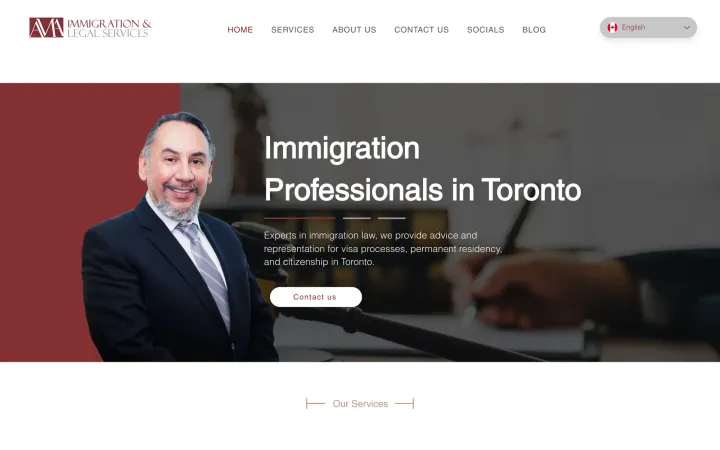
- AMA Legal, a Toronto immigration firm, serves clients in five languages: English, Spanish, French, Portuguese and Russian. Every service page exists in all five, so each client understands their options before the first consultation, then books and pays online.
- QRX Technology has English and French versions for Canada plus a US version, and visitors from the United States see the US site automatically, with US case studies and contacts.
- TechyWe, our engineering partner and sister company, sells in Spanish and English, with detailed case studies in both.
A quick launch checklist
- Languages chosen on evidence, with someone to serve each one
- Each language on its own URL, in a consistent structure
-
langattribute and hreflang tags on every page, includingx-default - Key pages reviewed by a fluent speaker with industry knowledge
- Menus, forms, emails, booking steps and metadata translated
- Language switcher on every page, linking to the matching page
- Keywords researched in each language
- A plan for keeping every version up to date
Getting started
List the languages your customers speak, pick the one with the biggest opportunity and translate your most important pages first. If you want help deciding or building it, see our web design service and marketing and SEO service, or start a conversation. We work in English and Spanish.
Frequently asked questions
Do I need a French version of my website in Ontario?
Most private businesses in Ontario are not legally required to have a French website, but federal institutions and some regulated sectors have language obligations. Businesses that sell in Quebec should check Quebec's language laws, which require French.
Is automatic translation good enough for a business website?
Machine translation is a useful first draft, but important pages should be reviewed by a fluent speaker. Awkward translations hurt trust, and poor quality content can also hurt search rankings.
How do search engines know which language version to show?
Each language version should have its own URL, declare its language in the HTML and use hreflang tags that point to the other versions. That tells search engines to show the right page to each audience.
Should I use /fr/, a subdomain or a separate domain for each language?
For most Canadian businesses, a subfolder such as /fr/ or /es/ on your main domain is the simplest option to manage, and every version benefits from the same domain. Separate country domains make more sense when you run genuinely separate businesses in different countries.
Which pages should I translate first?
Start with the pages that lead to a sale or a booking: your home page, your main service pages, contact and booking. Then add the pages that answer common questions, such as FAQs and pricing explanations.
Can I use flags for the language switcher?
It is better to use language names written in their own language, such as English, Français and Español. Flags represent countries, not languages, and many languages are spoken in several countries.
Proof, not promises